Showing posts with label NodeMCU. Show all posts

Friday, April 1, 2016

IoT Excitement - NodeMCU Pushes the Weather

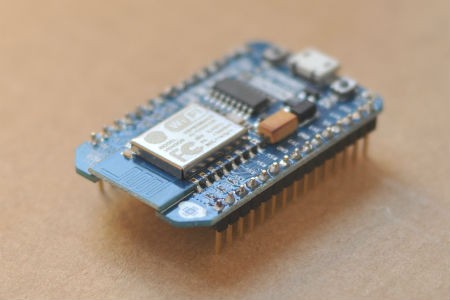
If you read my previous post, you know I've been messing around trying to decide what IoT stack to use as I build out a variety of projects. I've  been messing with NodeMCU a lot lately, in fact I've been able to connect it to a BMP085 sensor and publish intranet web pages with temperature and barometric pressure.  In the process, I've learned a few things about NodeMCU (a few additional things).

Basically, I find NodeMCU to be great at doing very little. No, I mean that literally - if there's something IoT really small you need to do, NodeMCU might be the right device. Might...

  • Ironically, in my previous post I discussed how NodeMCU could be programmed via Arduino. I was worried it might take up more memory, though, than programming in Lua. According to this blog, however, the opposite is true. Lua, being an interpreted language, sucks up tons of memory. I found that to be true - my original code attempted to open two connections in the same function. It couldn't run due to memory errors. 
  • I've mentioned before, but using NodeMCU is a kludgey experience. The device is awesome in principle, and it's only in its infancy, but connecting and disconnecting the USB cable to reset the device time after time... It gets old after a while. 
  • Lua is a relatively straightforward language, but it has its drawbacks (including taken up memory for comments).It took me two separate evenings to figure out how to successfully make an http connection. 
Regardless, let's jump in... The mission was to connect my IoT device to the cloud. The goal was to publish data to Weather Undeground - goal achieved: https://www.wunderground.com/personal-weather-station/dashboard?ID=KUTWESTJ26

I decided to connect to Adafruits IOT site, as well, just to make a little spiffy control out of it: https://io.adafruit.com/johnover/weather

To upload data, I'm using a simple init.lua script, then the bmp180.lua script (standard), then the wu_lite.lua script I wrote:


-- BMP085 and NodeMCU Weather Underground
-- Submits temp and pressure to WUnderground

--**************************************************************
   alti=1509 -- set correction for your altitude location in meters
--**************************************************************
   wifi.setmode(wifi.STATION)
   wifi.sta.connect()
   sda=4   -- GPIO2 connect to SDA BMP180
   scl=3   -- GPIO0 connect to SCL BMP180
   pres=0    -- pressure
   temp=0    -- temperature
   oss=0   -- over sampling setting

--load BMP module and read sensors
function ReadBMP()
   bmp180 = require("bmp180")
   bmp180.init(sda, scl)
   bmp180.read(oss)
   pres = (bmp180.getPressure()/100+alti/8.43)/33.86388667
   temp = ((bmp180.getTemperature()/10)*9/5+32)
   --fare = (temp*9/5+32)
   --print("Pressure:    "..string.format("%.1f",pres).." inches")
   --print("Temperature: "..string.format("%.1f",temp).." deg C")
   --print("Temperature: "..string.format("%.1f",fare).." deg F")
   --print(" ")

   -- push to WUnderground
   host = "rtupdate.wunderground.com"
   param = "/weatherstation/updateweatherstation.php?ID=<WU_ID>&PASSWORD=<wu_password&" ..
 "dateutc=now&tempf="..string.format("%.1f",temp).."&baromin="..string.format("%.1f",pres) ..
      "&softwaretype=NodeMCU%20version%20.01&action=updateraw&realtime=1&rtfreq=2.5"

   print(host .. param)
   sendRequest(host, param)
   
   -- host = nil
   -- param = nil
   
   
   -- ******************************************************************
   -- adafruit io
   -- create http client http://benlo.com/esp8266/esp8266QuickStart.html
   -- ******************************************************************
   host = "io.adafruit.com"
   param = "/api/groups/weather/send.json?x-aio-key=<Adafruit_IO_key&temperature="
           ..string.format("%.1f",temp).."&pressure="..string.format("%.1f",pres)
   
   sendRequest(host, param)
  
   -- release module
   bmp180 = nil
   package.loaded["bmp180"]=nil
end


function sendRequest(host, param)
   conn = nil
   conn = net.createConnection(net.TCP, 0)
   conn:on("receive", function (conn, payload)
               success = true
      print(payload)
   end)
   
   -- once connected, request page
   conn:on ("connection", function(conn, payload)
print('\nConnected')
   conn:send("GET " .. param.. " HTTP/1.1\r\nHost: " ..host.. " Connection: close\r\nAccept: */*\r\nUser-Agent: Mozilla/5.1 (compatible; esp8266 Lua; Windows NT 5.1)\r\n\r\n")
   end)
      
   conn:on("disconnection", function(conn, payload) print(' \nDisconnected') end)
           
   conn:connect(80, host)
   
   -- release connection objects
   conn = nil
   payload = nil
   --host = nil
   --param = nil

end
-- First reading data
ReadBMP()
-- Periodic reading of the sensor
tmr.alarm(1,300000,1, function()ReadBMP()end)

I had a lot of logic issues as I went along, then ran into memory issues which forced me to refactor (which in and of itself wasn't necessarily bad - I drove some efficiency into my programming).

The next step is to set this up outdoors and let it roll for a day or to. Then I need to figure out how to insert a time stamp (Adafruit's IO site doesn't calculate it for you). Once I'm done with that in Lua, I'll build the same functionality in Arduino and see how much better it runs.

Thursday, March 17, 2016

Pi vs Arduino vs NodeMCU vs ???

It's official - the Internet of Things has a lot of, um... things. So many options! Consider this: my friend and I are working on a weather station. Of course, it can't just be a simple weather station, it eventually needs to be a cluster of stations that can be used to measure differences in micro-climates. More on that later, LOL.

The initial goal is to put a weather station on a roof, without wires. With so many little devices, the question is simple: which is the right device for the job?

  • I started in on this the other day when I started messing around with the GPIO pins on the Pi. In about 10 min, I was reading in temp and barometric pressure data and thought "Dang, that's easy!". The Pi is awfully powerful and, now with the Pi 3, wifi-enabled.
  • And then there's NodeMCU. Very cool little wifi-enabled device that can take signal on a variety of analog, digital and serial-dedicated pins. And then it can run Lua to actually form that data into "IoT" capable packages, like HTML pages or JSON packets. Finally, it can be a rudimentary http server, so data can be retrieved (conversely it could be written as a client, to push data directly into the cloud). Seemed to me to be the perfect solution.
  • My friend Chuck is a strong advocate for using the Pi with an Arduino on a Pi alamode board. The arduino collects the data, the alamode board pushes that data into the Pi, and the Pi processes it.
My take? I see four viable solutions for getting the data off the Sparkfun weather shield and into "a consuming sink" such as the cloud, a data aggregator like a database, or published to the web.
  1. Weathershield to Pi via GPIO interface
  2. Weathershield to Pi via Arduino
  3. Weathershield to NodeMCU
  4. Weathershield to Arduino with WiFi chip
Each solution has advantages and disadvantages, and that's what we're doing to explore now.

Weather Shield to Pi via GPIO

This is an elegant solution - it requires the Weather Shield, some connecting wires, and a Raspberry Pi. It's elegant in that there are few moving parts - wire it up, good to go. Right? Wrong. Not all of the Weather Shield components seem to have Python libraries available, which means the coding would need to be done in C. Not impossible, but not necessarily straightforward.


Acquisition cost: 
  • Weather Shield: $39.95 + shipping
  • Raspberry Pi 3: $35.95 + shipping
  • Misc parts: $5
  • Total: $80
Development effort:
  • Moderate to high

Weather Shield to Pi via Arduino

This is the easiest solution to build, frankly. The weather shield runs great on the Arduino, all sorts of libraries and sample code abound on the Internet. 

Acquisition cost:
  • Weather Shield: $39.95 + shipping
  • Raspberry Pi 3: $35.95 + shipping
  • Raspberry Pi Alameda: $35.00 + shipping
  • Misc parts: $5
  • Total: $115 + shipping

Weather Shield to NodeMCU

By far the most elegant solution, holy cow... Suspend disbelief briefly and take a walk with me... You have a weather station on the roof, which feeds data into a Sparkfun weather shield. That shield, in turn, feeds data into a NodeMCU chip - tiny, quarter-size chip with wifi on it. The NodeMCU does three things: 1) it pushes the data to a cloud service, every N minutes; 2) it serves the data up via JSON string to anyone on the local network, and 3) it serves up data via formatted HTML on the local network. Awfully cool, and the cost? Nominal.


What's the issue? Simple - the libraries for the components of the weather shield only exist in part, and it's a process of porting them to Lua to make them work. The other problem: NodeMCU only has a single analog pin, whereas the weather board uses three or four.

--> Caveat: the NodeMCU *can* be programmed via Arduino, using Arduino libraries. I need to look into this more; not sure if there's enough memory to do it, though. And the Arduino environment has convoluted support for outputting HTML. I think I just need an afternoon to figure it out though. But still, the bottom line is it's not the right tool for this job.

Acquisition cost:
  • Weather Shield: $39.95 + shipping
  • NodeMCU: $15.00 + shipping
  • Total: $55 + shipping

Weather Shield to Arduino with Wifi Chip

This solution is honestly just a variant on the above solution - the weather shield speaks to an Arduino (great library support) and the Arduino uses a Wifi chip on a shield to publish the data. 

Slightly more expensive than the standalone NodeMCU solution:
  • Weather Shield: $39.95 + shipping
  • Arduino Uno $24.95 + shipping
  • Ada fruit Huzzah wireless shield: $39.95 plus shipping
  • Total: $105 + shipping

Summary

The cheapest possible solution, using the Weather Shield with NodeMCU, is not possible because NodeMCU only has a single analog pin and the weather shield needs multiple. That doesn't mean NodeMCU isn't a useful tool - I have a couple of other projects it might be perfect for. It does mean, however, that it's the wrong tool for this job.

From a financial perspective, the lowest cost solution is the Weather Shield plus the Raspberry Pi. It presents some problems - probably not insurmountable, but there'll be some effort to integrate the Weather Shield natively into Pi via Python or C. The time spent may not be worth the money saved over the alternatives (which both make use of an Arduino to read and interpret results).

So a little research is needed, to see how well the Pi can work with the Weather Shield's components. That's how to solve this specific application, but making a global rule overall? Globally I think it's easy to say that the NodeMCU is a low-cost solution but will almost alway have a steep implementation curve, at least until the dev community matures and catches up with Arduino. Overall from a sheer convenience perspective, the best solution is either 1) Arduino with Pi or 2) Arduino with wireless.

Bottom line: my buddy Chuck is right. When I insisted I take some time to look into building this solution with something other than Arduino, he told me I was wasting my time. I *was* right in that it would be more elegant, but he is right from a practical perspective. Everything is just "there" and ready to use, if Arduino plays a role in the solution.

Wednesday, March 16, 2016

NodeMCU for the Absolute Beginner - Lessons Learned

About a year ago, a buddy of mine who knew I was really into Raspberry Pi and Arduino encouraged me to look into NodeMCU. It's an IoT hardware platform with an onboard Wifi chip as well as a linux-based OS which is programmable in Lua. I messed around with it long enough to see it connect to the web and download a test page from Adafruit, but honestly? I was starting my own business and absolutely swamped.

Fast forward a year. A long year. A year of almost no hacking - Arduino, Pi, nothing... On a whim, I broke out my Pi and started messing with the GPIO interface and soon had a BMP085 sensor connected to a Python script, writing temp data into a csv file. Pretty cool! Not included to quit while I'm ahead, and finding myself waiting on a couple of clients (and therefore with some 'flexible' time), I decided to break out the NodeMCU. Turns out, someone had gotten the BMP085 working on NodeMCU. After several hours across a couple of days, and running into a steep learning curve, I finally got my BMP085 working on NodeMCU as well!

NodeMCU - This Ain't a Piece of Pi (or Arduino)

OK so you want to jump aboard the IoT craze and get involved. You're familiar with Arduino but you want something lighter, faster, and network enabled. That fancy NodeMCU dev board has been calling you, right?

All in all, it's a nifty idea and it works well (once you get past the learning curve). But if you're coming in from Visual Studio, from Xcode or even from Arduino Studio, be warned: this is not a polished experience. In fact, it's pretty ugly and dirty. Lots of flashing, formatting, serial communications await you before you actually have a working application. It is definitely not for the faint of heart, but if you persist, you'll get there.

Not a Tutorial

This article isn't a tutorial, per say, but a collection of things I picked up over the past few days. Really, there are 3-4 'gotchas' that I'm going to document. There are plenty of tutorials out there, but many of them skip over the 'what the heck do I do now' scenarios. Hopefully I can fill in the gap for you a bit:
  • Flashing can be tricky. Use Windows.
  • Establish a serial connection as the Node device powers up, so you can see any error messages.
  • Debugging is a pain - you need to check for messages as soon as the device boots.

Flashing

I did most of my work on my Raspberry Pi--not really sure why except that it's a throw-away environment where I'm always in screen or minicom, so I wasn't overly concerned about messing things up, and I had all the tools I needed. It might be faster to work elsewhere (I'm running a Pi 3 B+ so it's actually not heinous). There's even a fancy flashing tool (esptool) available for Linux. However... don't do it. I ran into a really weird issue where I saw symptoms like:
  • Device showed up online, but worked 'wonky'
  • I could program it in Arduino studio with the NodeMCU plug in
  • I could not connect to it on Linux over serial comm, unless I tried 115200, but even then things were just weird.
I tried refreshing it with the esptool, which appeared to succeed, but which in the end actually failed.

The answer? Use the Windows flasher tool to flash the build. I spent a good 2 hours one evening digging around trying everything I could think of and finally powered up a Windows machine, flashed it and <poof> everything worked great.

Don't. Seriously, just don't flash it on Linux. Use Windows. It's worth the time you'll save.

Establish Serial Quickly

When the NodeMCU powers up, it very quickly spits some diagnostics to the serial port. It's important that you catch those diagnostics, to be sure you see any messages that might crop up, oh, if your code has a syntax error or such. There is NO INTELLISENSE and NO DEBUGGING on this platform. If you write a mistake, you're not going to catch it any other way besides 1) manual code review or 2) catching the Node as it boots. So be quick on the "screen /dev/ttyUSB0 9600" command, as soon as that device boots.

Debugging

I said it above, but... I created a web page to serve up my inside temp information. I had some syntax errors on the page (not surprising, since I was editing in Leafpad and had some rather convoluted HTML code). I tried three ways from Sunday to get the thing to run. I rebooted it 15 times, but each time I tried to connect, Safari or Android Chrome responded with a connection reset error. I could ping the device (and get responses), but it just wouldn't serve a page.

So then I remembered my point about establishing serial quickly. The next time I powered up, I opened up a serial console ASAP and sure enough - the device spat out some error message about malformed HTML. Fixed it and I was good to go, but I lost a couple hours on this.

Conclusion

I see a lot of great uses for the NodeMCU devices. Remote weather stations no longer need wires. You can put moisture sensors in the far corners of your damp basement. I'm even planning to use one for model rocket telemetry information. It's really a clever device, and the Lua language is rather fun to use. This is going to be a fun device in my arsenal. Keep an eye, by the way, at my other blog securitygeezer.blogspot.comsecuritygeezer.blogspot.com because I have a feeling the NodeMCU device is going to come in handy on penetration tests and such.