Wednesday, November 15, 2017

OLD Trip Report: Hiking the Wave

In December 2015, my wife and I both put in for the lottery for passes to hike The Wave (www.thewave.info), a geological formation in Arizona (approached from Utah--so we kinda claim it as ours). We won the lottery for a date in April, and this is as detailed of a trip report as I can come up with. I found as I was preparing for the trip that there's not a lot of great info

Getting There

There are several steps to "getting there" to hike The Wave:
  1. You need a pass to get in. The area is so incredibly photogenic and such an amazing geological formation that people would overrun it if it wasn't controlled. Therefore the Bureau of Land Management limits entry to 20 hikers per day - 10 by a quarterly lottery and 10 by a daily lottery at their office. We tried for nearly two years to get in - your mileage may vary.
  2. Once you have passes, you need to actually get to the Wave. The trailhead is about 9 miles down an "unimproved" gravel road, which is about 40 miles east of Kanab Utah. If you're into camping, there are unimproved camp sites all along the road, and at the Utah/Arizona border there is a formal campground. If you're into hot water and a comfy bed, Kanab is your closest option (unless you're coming from the East, in which case Page may be an option). Kanab is Utah's most recently "discovered" city and, as such, has several new hotels as of 2016, to fit even the most demanding guest. We stayed at the Comfort Inn and Suites and loved it - great people, great rooms, good rates.
  3. Get ready for danger. The Wave is a 100% exposed hike - there isn't significant elevation gain (maybe 400 feet total) but it is exposed and, for the most part, on red and orange slick rock. We hiked in 60 degree weather and I still drained a 70-ounce CamelBak. Bring:
    1. Water (and lots of it)
    2. A wide-brimmed hat (it's not about the looks, cowgirl)
    3. Sunscreen (and lots of it)
    4. Sunglasses (the darker, the better)
  4. The trail isn't significantly rugged. I hiked it in low-top hiking shoes and never had an issue. Most of the trail is on slick rock or in sand.
  5. Find a high-clearance vehicle. The road is unimproved - we were there in the "rainy" season, and approached the day after heavy rain had fallen. It was badly rutted. As it tuns out, a variety of two-wheel drive passenger cars ultimately made it to the trailhead (including a Honda Accord). I didn't want to chance it, so we ended up renting a four-wheel drive vehicle (Jeep Cherokee) from a Kanab-based rental company (Express Rent-A-Car http://www.xpressrentalcarofkanab.com/kanab-car-rental-rates.cfm). $150 a day was a bit high for what we got (a Cherokee with 98,000 miles - and you felt every one of those miles) but it was competitive with the alternative (renting from St. George and driving back and forth). Nonetheless it got us where we wanted to go, without incurring (or worrying about incurring) damage to our car. I suppose in the dry season, especially a few weeks after the last rain, any car can make it - the ruts will be knocked down and the road should be relatively flat (I wouldn't say "smooth"). But any other time, when rain is in the forecast, better safe than sorry. You'll cross several washes on the way in (a wash is where a stream crosses the road - or the road crosses a stream) which, during heavy rains, will become overrun with water flowing fast enough to sweep a car away.

Finding Your Way

Thanks to Google Maps - here's a map from Salt Lake City:

From Kanab, Utah head east on Route 89. The road will eventually bend left in a long sweeping curve, and shortly thereafter bend right in another long sweeping curve. After a short straightaway, the road takes a sharper left turn - this is where the trailhead cuts off, to the right. Go slow, it's a sharp turn!

House Rock Valley Road follows a canyon of sorts, south from 89 deep into the Vermillion Cliffs park. The drive in is gorgeous, especially after rains have fallen. The topography is green and, well, maybe not lush but pretty amazing for Utah's dry side! The drive itself is worth the trip from Kanab.

After what feels like 100 miles (at least in an old Cherokee), you'll get to a very obvious trailhead complete with BLM pit toilets. Park there on the west side of the road. The trail begins on the east side of the road.

The Approach

The BLM will provide you with an excellent photographic guide - color photos of what you should see as you approach and depart the Wave. DO NOT RELY on this alone - the way back can be confusing and it's easy to get lost! The BLM map includes GPS coordinates - invest in a GPS (don't use your phone, use a real GPS) and punch those coordinates in. This is a map from Topo Maps:


Note that the trail isn't as beeline-straight as the map shows. It wanders, but eventually you'll cross each point.

The trail starts out following a wash. After 1/2 a mile in the wash, it heads up a short, but steep, hill and the adventure truly begins. From here you will climb and descend over sand dunes as well as slick rock hills. 


Sand Ribs (C) 2016 John Overbaugh

The rock formations are absolutely amazing - some look like topographic maps, some look like Jabba the Hutt. No kidding:


You're in for a treat, as you draw nearer and nearer to the Wave, the formations become more and more interesting. Nothing to prepare you for the natural beauty of the Wave, mind you, but still interesting in and of themselves.

It's difficult to tell from the topographic map, but the trail really is up, or down. There's not much flat to it. Combine this with high exposure, then throw high temperatures in (in the summer, it can reach and exceed 120 degrees in the afternoon), and layer on bright, reflective rock and you have a formula for disaster. PAY ATTENTION: people die here. They get dehydrated, disoriented, and lost. The BLM does not patrol the trail--you're at the mercy of other hikers, but if you stray far from the trail, even they can't help. Bring lots of water. Bring too much water, so you can share it with others. Leave the extra tripod or second camera body at home and bring extra water.


Twin Buttes (C) 2016 John Overbaugh

Pay close attention to the photographic guide from the BLM. It's easier to follow on the way in than the way out, and when you're returning you'll be tired. It's important to slow down, pay attention to your surroundings, and find the (few) brown markers the BLM has placed to help you find your way. Taking a little time to route find will save you a ton of time backtracking (no really, believe me - I have hundreds of days in the backcountry and even I had to "re-route" a few times on the way home).

Eventually you'll come down off some slick rock, just below what we called "The Sphinx" (see photo), across a wide sandy wash. Ahead of you is a steep sandy slope that eventually turns into slick rock. Start climbing - the Wave awaits you!


The Sphinx (C) 2016 John Overbaugh

The Wave


OK--what is the wave? It's an amazing maze-like formation cut out of multi-layered, colorful sandstone. It's Y shaped, with the "V" part of the Y facing you as you approach (so the top of the Y is northward). The tail of the Y slopes up a steep wall, to a flat area about 100 feet above the Wave. Keep in mind this 3-d "Y" is cut into a solid mass of sandstone - thus exposing the various colors of each layer in the rock.


Looking south into the intersection of the "Y" shaped wave. (C) 2016 John Overbaugh

The other entrance to the wave is a quick backtrack out of this one. Head out, bear to the left around the hill outside the wave, climb up a few steps and you're entering the smaller top of the "Y". 


The Wave (C) 2016 John Overbaugh

As you can see, the Wave is just incredible. Geological forces stretched the rock, causing curves in the layers (almost like salt water taffy). It doesn't hurt to hike with someone as cute as my wife, either--it just enhances the sights!

After a short distance (25-30 feet) this section intersects with the rest of the "Y"


The Wave (C) 2016 John Overbaugh

Walking around the Wave gives an amazing variety of views and experiences.

Folds of Waves (C) 2016 John Overbaugh

Finally, as you ascend the 'headwall' on the southern end of the Wave, you'll be rewarded with an ever-changing view, with fold after fold of rock:


More Folds of Waves (C) 2016 John Overbaugh


Wavy Landscape (C) 2016 John Overbaugh

Friday, March 17, 2017

Winter Projects

The '16-'17 winter was very good to the Vstrom DL 650. We tackled a number of projects (my son Caleb helped me out on each of them). Kind of short on photos, just because it was a "doers, doing" kind of series of sessions...

Gaffler Stainless Brake Lines

I added some Rox 2" bar risers late last fall, which were stretching my factory brake lines too much for my comfort. So over the winter break, my son came down and we installed shiny new Gaffler stainless steel brake lines. I've never bled brakes before, but hey... I can't be that difficult right? Spoiler: it wasn't.

The process began by draining the brake fluid. If you've read my other posts, you know the store of this bike. It's an '08 DL650, bought in Oct 2015 with 1600 miles on it <fist pump>. I did the second oil change on it, and I've done all the factory maintenance since. Every hose, every seal I've inspected, and every fluid has come out looking brand new, and the front brake fluid was no exception. But they say to change brake fluid about every season, so it'd either been 8 seasons or 3 seasons, depending on how you measure a season.

Draining the fluid isn't difficult. Pull off the master cylinder cover and open the bleed valves on each caliper. I then pulled off the lines themselves and chucked them (and in hindsight realized I might have been able to help a buddy out and offered them up on the Stromtrooper forum--sorry, pal).

I'd ordered 2" extended brake lines from Gaffler, which arrive timely and in good shape. The install was a snap, other than a mistake in routing them (I ran them too low, which interfered with a later project of installing lever guards).

Bleeding brakes is pretty intuitive, once you get the hang of it. There are several good youtube videos to get you started, I particularly liked this one; Lemmy at Revzilla does a great job: 


My son did mess up once, and allowed the reservoir to drain too far, so we had to start all over again, but no big deal. It still took well less than a single bottle of NAPA DOT3 fluid.

Sorry, only got one shot. Gaffler offers several colors, in factory lengths but with the option to go longer, for situations like mine (bar risers) or situations where you're adding clip-ons. It's a good idea to have just about the exact length needed, rather than having a lot of slack. The kits come complete with clips to hold the lines, banjo bolts, and crush washers. You do need to check your service manual to determine the appropriate torque for the banjo bolts (top and bottom).

One note for Strom owners: the factory brake lines have a single line to a T right above the fender but the Gaffler kit is two separate lines, one for each side (and very clearly labeled).


The rest of the time that evening was spent checking the air filter (no small feat on a VStrom), re-routing some wires, etc.

If you're wondering about whether you can tackle this job, just go for it. I can't imagine how someone could get this wrong if they watch a few videos and then pay attention.

Friday, September 30, 2016

Driving Lights

My wife's biggest concern about me riding is the safety aspect - namely that others can't necessarily see (or register that they're seeing) me on the bike. I wear a bright yellow jacket, and add a reflective vest at night, but that's just not quite enough. After setting up my auxiliary power circuit (http://k7jto.blogspot.com/2016/09/auxiliary-power-mod.html), I decided to tackle driving lights.

I'm not a cheapskate, but I don't like to spend money where it's not needed. So while my first thought was to spring for a set of Denali driving lights (north of $200), I decided to give something more affordable a try, first. Enter the Lylla headlamp: $26 on Amazon.com. The lamp ships with a switch (which I've set aside and saved for another project) and two LED lamps. A few days after I ordered, the lamps arrived. They were, well, larger than I expected!


As always, the first challenge was where to install the lamps. They ship with a bracket, but the default configuration requires the bracket be mounted to a round bar which is perpendicular to the direction of travel. It meant I couldn't use the engine guards, and the generous fairing on the Strom also meant I couldn't use the handlebars. Eventually I realized the fender bolt would be perfect:


With the destination selected, the next step was to slightly modify the bracket--the shoulder on the fender bolt is a tiny bit larger than the hole at the base of the light frame:


The benefit of cheap Chinese metal is that it files quickly.

Once I modified the base of the bracket, it was simple to get installed:


With the frame mounted, it was a simple matter of installing the light and closing up the frame:


 Finally, I wired up everything to a power lead I pulled up from the fuse block in the back, and presto - there was light!


Auxiliary Power Mod

I wanted to add a variety of auxiliary power components to my '08 Suzuki V-Strom (DL650), way back when I bought it. I've been sitting on this project ever since - here's the write up (with a few photos).

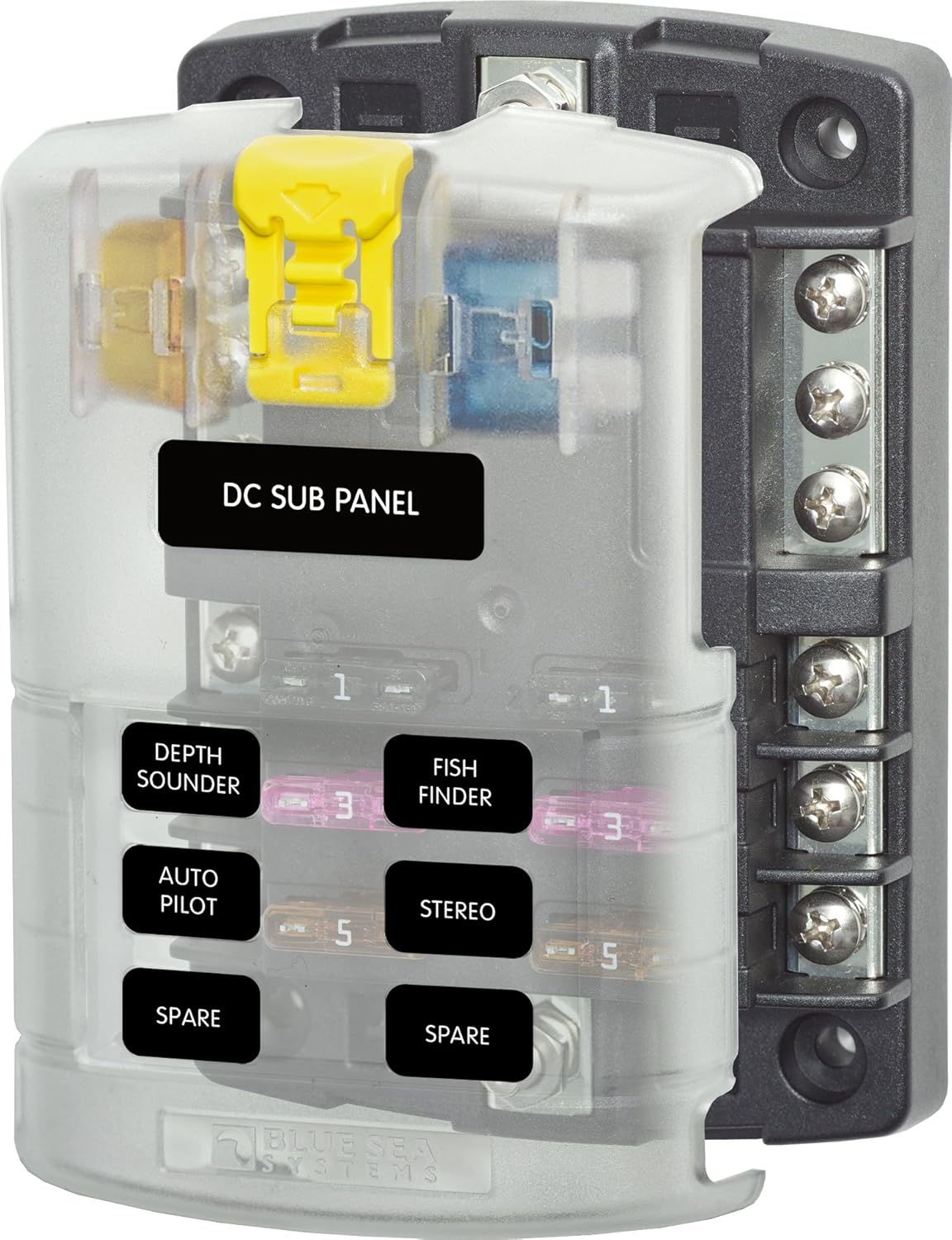
The V-Strom has one or two spare, switched circuits (with an amperage rating of 10 amps or so). On a bike that'll eventually have driving lights, USB power, 12v power, GPS, perhaps heated grips and/or seat, that extra circuit or two won't go far - you'll end up making a choice: "Do I want warm hands, or do I want my GPS?" I don't believe in a world of 'or' - I'm always living life in a world of 'and' (it drives my wife crazy sometimes). So I quickly recognized a separate series of circuits would be necessary in order for me to stack on new features. And thus my project was born.

I started out by buying a marine-grade fuse block. My first was a 12-circuit block, which I quickly realized was going to be too big (I had originally planned on installing the block near the battery under the seat). So I downsized to the six circuit fuse block:


I bought this back in February, and it's sat unused taking up room in my drawer ever since.

Next, I knew the fuse block had to be direct-connected to the battery. It couldn't pull power for everything it'd support from any existing circuits. But I also knew I didn't want to risk parasitic (or accidental) power drains and a dead battery, so I knew it had to be 'switched' with the motorcycle's ignition. Therefore, my next requirement was clear: I needed a relay connected to the ignition, which would close the circuit from the block to the battery.

A Little Bad Weather Can Be a Good Thing

In late September, my wife had a trip scheduled with some friends. I planned to take my own trip, riding the Strom down to Canyonlands, then returning to Salt Lake via Colorado and Dinosaur National Monument. As the trip date neared, the weather forecast worsened. While my destination basked in 80-degree sunshine, the route there was experiencing Utah's version of biblical floods (ie, 2" of rain in a 24-hour period). I chose not to go (and I was grumpy!). As Saturday passed, the weather cleared and I hopped on the bike to visit my friend and "elmer" (amateur radio speak for 'mentor'). Chuck and I tackled the install, and I'm tickled pink with the results.

The Install

Fuse Block Location

Our first task was to find a location for the fuse block. I ultimately chose to put it where the factory tool bag is stored. It's accessible, but well-secured:


Relay Setup

After choosing the location for the fuse block, our next task was picking a circuit to power the relay with. It could honestly be any circuit, but we noticed in the fuse box that there is a "spare" circuit which is actually wired and functional (as opposed to just being an empty space in the fuse box):


We pulled the fuse box out, removed the fuse box for the starter motor so we had some room to work, and simply tee-ed off the "spare" wire and ran that to the relay. We ran a wire from the relay to ground, flipped the ignition, and heard that beautiful sound of the relay closing. Successful step 1!

Putting it Together

Finally, we needed to get the actual power from the battery to the fuse block. We connected a second ground and ran it straight to the fuse block's ground pole. We then ran power from the battery to the relay and from the relay to the fuse block's power pole. It looks a bit confusing, but again - it works.


Here's a shot of the fuse block (no fuses installed and nothing connected - but it powers up great):


And again - the final installation:


Thursday, September 29, 2016

Happy Trails Center Stand

I've had my eye on a Murph's Kit center stand (http://www.murphskits.com/), but he stopped carrying them (to his credit, he recently pointed me elsewhere, but I'd already purchased one elsewhere). With SW Motech and other stands coming in well over $200 (as much as $280) for my '08 Wee, I started hunting the forum. I came across a reference to Happy Trails (http://www.happy-trail.com/), which is located just north of me in beautiful Boise, Idaho.


I put my order in for their affordable center stand on Monday - it arrived today and was installed in about 20 min over my afternoon work break. Here's my report.

Installing is literally a snap. Four bolts, some spacers and a few washers. The directions are well-written and it's easy to follow along (provided you are even somewhat mechanically inclined). The only thing I recommend is to dry-fit each of the four bolts. My Wee had paint and grime in the lower bolt holes, which made threading the bolt a bit difficult. Also keep in mind that the top bolt on the right side is simply a beast to get to. Accept it--as the Tao says, take the path of water... Some patience and you'll get it.

The item was well-packaged and arrived without damage and with all of its parts. Unlike some center stand kits, the springs are pre-installed, making the overall installation quick and (relatively) easy. Once the bolts were sorted out (large 10mm bolt on bottom, smaller Allen-head 8mm bolt on top on both sides), I performed the install.

Oh--unless you like redoing things, I recommend some blue Thread-Lok on the bolts.

LEFT SIDE
The left side is the side recommended to start with. It went pretty easy, once I learned to pre-thread the bolts. I started with the top bolt, then installed the bottom bolt. Snugged everything up real tight.


RIGHT SIDE
Here's where patience comes in. Start with the bottom bolt, and add both of the extra washers for spacing. Snug it up, but not too tight - you want the bottom bolt to align the bracket, but not to hold it too rigidly.

Next, carefully insert your left hand into the miniscule space between the wheel and the exhaust pipes (obviously don't do this while the pipes are hot). Slide the 8mm bolt in through its hole, then carefully slide each washer and the spacer over it. Align the bolt and through some sort of voodoo, start threading it. I used a very long 7mm allen wrench. It didn't align well, so I went carefully. If you have a wobble-head (round-head) allen wrench, all the better. I've yet to invest...


As you can see, the "fit" is tight (it's not really a fit - had to pull the allen wrench out with vice grips). But eventually you'll get that top bolt tightened. Grab your torque wrench and torque everything down (BTW: 17 foot pounds is 23.5 NM and 34 foot pounds is 46.5 NM).


Next up: learning the balance point. It was a struggle to get this on the stand the first time. I'm glad I have it now - lubing the chain should be a lot easier (instead of chasing it all around the garage and driveway).


Happy Trails Center Stand

I've had my eye on a Murph's Kit center stand (http://www.murphskits.com/), but he stopped carrying them (to his credit, he recently pointed me elsewhere, but I'd already purchased one elsewhere). With SW Motech and other stands coming in well over $200 (as much as $280) for my '08 Wee, I started hunting the forum. I came across a reference to Happy Trails (http://www.happy-trail.com/), which is located just north of me in beautiful Boise, Idaho.


I put my order in for their affordable center stand on Monday - it arrived today and was installed in about 20 min over my afternoon work break. Here's my report.

Installing is literally a snap. Four bolts, some spacers and a few washers. The directions are well-written and it's easy to follow along (provided you are even somewhat mechanically inclined). The only thing I recommend is to dry-fit each of the four bolts. My Wee had paint and grime in the lower bolt holes, which made threading the bolt a bit difficult. Also keep in mind that the top bolt on the right side is simply a beast to get to. Accept it--as the Tao says, take the path of water... Some patience and you'll get it.

The item was well-packaged and arrived without damage and with all of its parts. Unlike some center stand kits, the springs are pre-installed, making the overall installation quick and (relatively) easy. Once the bolts were sorted out (large 10mm bolt on bottom, smaller Allen-head 8mm bolt on top on both sides), I performed the install.

Oh--unless you like redoing things, I recommend some blue Thread-Lok on the bolts.

LEFT SIDE
The left side is the side recommended to start with. It went pretty easy, once I learned to pre-thread the bolts. I started with the top bolt, then installed the bottom bolt. Snugged everything up real tight.


RIGHT SIDE
Here's where patience comes in. Start with the bottom bolt, and add both of the extra washers for spacing. Snug it up, but not too tight - you want the bottom bolt to align the bracket, but not to hold it too rigidly.

Next, carefully insert your left hand into the miniscule space between the wheel and the exhaust pipes (obviously don't do this while the pipes are hot). Slide the 8mm bolt in through its hole, then carefully slide each washer and the spacer over it. Align the bolt and through some sort of voodoo, start threading it. I used a very long 7mm allen wrench. It didn't align well, so I went carefully. If you have a wobble-head (round-head) allen wrench, all the better. I've yet to invest...


As you can see, the "fit" is tight (it's not really a fit - had to pull the allen wrench out with vice grips). But eventually you'll get that top bolt tightened. Grab your torque wrench and torque everything down (BTW: 17 foot pounds is 23.5 NM and 34 foot pounds is 46.5 NM).


Next up: learning the balance point. It was a struggle to get this on the stand the first time. I'm glad I have it now - lubing the chain should be a lot easier (instead of chasing it all around the garage and driveway).


Tuesday, August 9, 2016

Tablet as GPS

I've been building up a stock 2008 Suzuki VStrom 650, into a more comfortable, better equipped adventure bike. One of the modifications I have made is to add the ability to use an old Nexus 7 wifi tablet as my GPS unit. I'm kind of a cheap guy, so as usual that means I've needed up spending more than necessary, in an effort to keep the investment cheap.

The first need was power. You can't take a multi-day ride with a tablet on maximum brightness and not have aux power. I purchased what looked like a rugged 12v USB socket from Amazon--unfortunately, it died before I could use it (no clue why--the wires show no sign of heat damage, the inline fuse is fine, and it has never been wet because I garage my bike at all times). At the time of this writing, I am back to the drawing board on this step.

The next challenge was the mount--how to secure a tablet to the bike. The tablet I have chosen, the Nexus 7 wifi, is really light. I purchased a rugged case for it, but even then it's well under a pound. My first effort was to try to hack a cup-holder phone cradle to work--I tore it apart till I just had the stem, but couldn't find a way to install it without 1) compromising safety and 2) damaging the very visible cockpit area. Finally, I bit the bullet and purchased a RAM Mount marine mount as well as and Adventure Tech GPS mount (http://www.adventuretech.biz/over-the-dash-gps-mounts.html) The mount install was painless and the RAM mount seems really secure. (NOTE: I had to push the photos quite a bit to get them lit up enough to see, so they're grainy):


The next challenge was mounting the tablet to the RAM Mount. The case I purchased has a rubber cover for the tablet, with a hard plastic back which separates from the rubber cover. I matched up the RAM mount mounting plate holes to the vertical and horizontal center of the rigid plastic back, drilled holes, and used some flathead automotive mounting posts to fix the plastic to the mounting plate.


Now I have a ruggedized tablet fastened to a RAM Mount, just above my instruments, which it is visible but not distracting. Using Bluetooth, I can connect my Sena headset to the tablet, where I receive turn-by-turn directions as well as music (the Sena can connect multiple devices, so I also have my phone connected, in order to take calls).


Why a tablet, instead of the Garmin GPS most riders carry? Price, convenience, and functionality.
  • The Garmin GPS is $500-$600 new. I already own the tablet.
  • The tablet has a camera which will take shots (still and video) right through the windscreen, so it's a great way to capture snippets from the road.
  • The tablet allows me several options in terms of GPS apps.
  • I can run Rever on my tablet, which is how I plan, track, and share rides with others.
  • The tablet also allows me to write and assemble blog entries.
  • With the tablet, I can connect to and pull content off my Nikon J5 as well as my GoPro, to enhance blog entries.
  • The tablet is lighter than a Garmin, but has a larger screen and much higher resolution.
  • With an Android device, I can keep in touch via social media whenever I stop. If I'm not somewhere where there is wifi, I can use my phone as a hotspot.
I proved this out on the road recently, riding from Salt Lake City to Ely, NV to Wendover and back to Salt Lake City. The tablet is a bit heavy - the VStrom fairing moves quite a bit already, but it's obvious there's additional weight on it. Nonetheless, the system worked quite well. Once I get the power issue resolve, this will be a great solution.